MCP Sessions  

In addition to regular API Sessions, Wallarm provides dedicated support for Model Context Protocol (MCP) sessions. MCP sessions group MCP tool calls, resource reads, and prompt invocations into logical sessions, giving you visibility into how AI agents interact with MCP servers.
MCP sessions are displayed in a dedicated MCP Sessions tab in Wallarm Console → API Sessions.
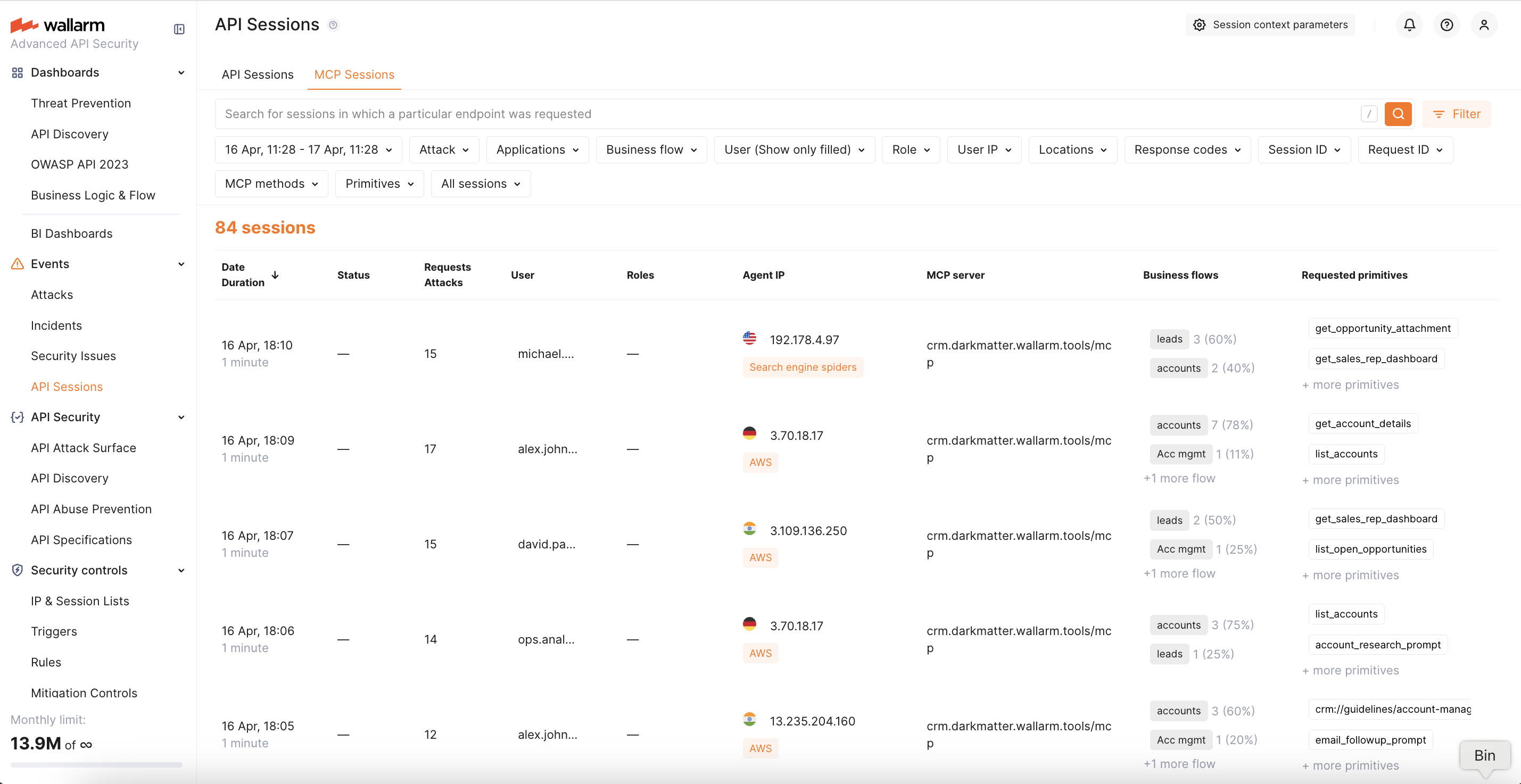
How MCP Sessions work
When Wallarm detects MCP traffic (JSON-RPC 2.0 requests with MCP-specific methods), it groups requests into sessions based on the Mcp-Session-Id header — a standard MCP protocol header that identifies a session.
For each MCP session, Wallarm displays:
-
MCP server — the host and path of the MCP server endpoint
-
Session ID — the value of the
Mcp-Session-Idheader -
User and Role — extracted from session context if configured
-
Methods — MCP methods called during the session (
tools/call,resources/read,prompts/get, etc.) -
Primitives — names of tools, resources, or prompts accessed during the session
-
Attacks — any attacks detected within the session by MCP mitigation controls or other protection mechanisms
You can click on any session to see the full request sequence, with each request showing its MCP method, primitive name, and request/response details.
Requirements
-
The Advanced API Security subscription plan
-
NGINX Node 6.12.0-rc1 or higher, or Native Node 0.25.0-rc1 or higher
MCP Session Configuration
MCP sessions are detected automatically — the Wallarm node recognizes MCP traffic by JSON-RPC 2.0 patterns and groups requests into sessions using the standard Mcp-Session-Id header. No manual configuration is required for basic MCP session detection.
When API Discovery detects an MCP server, it automatically creates an MCP Session Configuration with default rules (extracting session ID from the Mcp-Session-Id header). You can view and customize these auto-created configurations or create new ones manually.
You can optionally add MCP session context parameters to extract additional information from MCP traffic, such as user identity and role. This enables:
-
User and role display in MCP session details
-
Filtering MCP sessions by user or role
-
User- and role-based ACL policies
MCP user and role
MCP sessions have their own user and role, separate from the HTTP-level user. A single AI agent may interact with multiple MCP servers using different identities. The extracted MCP user and role are written into the standard session user/role fields for display and filtering.
To configure MCP session context parameters:
-
Go to Wallarm Console → API Sessions → click Session context parameters.
-
Switch to the MCP Sessions tab.
-
Select an existing MCP server (auto-created by API Discovery) or click Add MCP Session config to add a new one manually. For a new server, specify:
- Host — the hostname of your MCP server (e.g.,
mcp.example.com) - Location — the path to the MCP endpoint (e.g.,
/mcpor/sse)
- Host — the hostname of your MCP server (e.g.,
-
Within the selected MCP server configuration, add context parameters. Each parameter specifies a request/response location and its type:
Type Description MCP Session ID Location of the session identifier. By default, the node uses the Mcp-Session-Idheader. Set this only if your MCP server uses a non-standard session ID location.MCP User Location of the user identifier (e.g., a JWT claim or a custom header). MCP Role Location of the user role (e.g., a JWT claim). -
Click Save.
Exploring MCP Sessions
MCP sessions can be explored in the MCP Sessions tab in Wallarm Console → API Sessions. Like regular API sessions, MCP sessions are split into daily parts and stored for 7 days. The tab provides the same capabilities as regular API Sessions (except CSV export, which is not available for MCP sessions):
-
Filter sessions by time range, user, role, MCP server, or attack type
-
View the full sequence of requests within a session
-
Inspect request and response details for each MCP call
-
Navigate to the attack details and the mitigation control that triggered detection
When viewing request details within an MCP session, the following MCP-specific information is displayed:
-
MCP method — the JSON-RPC method (e.g.,
tools/call,resources/read) -
Primitive name — the tool, resource, or prompt name
-
Arguments — the parameters passed to the tool call (for
tools/callrequests)
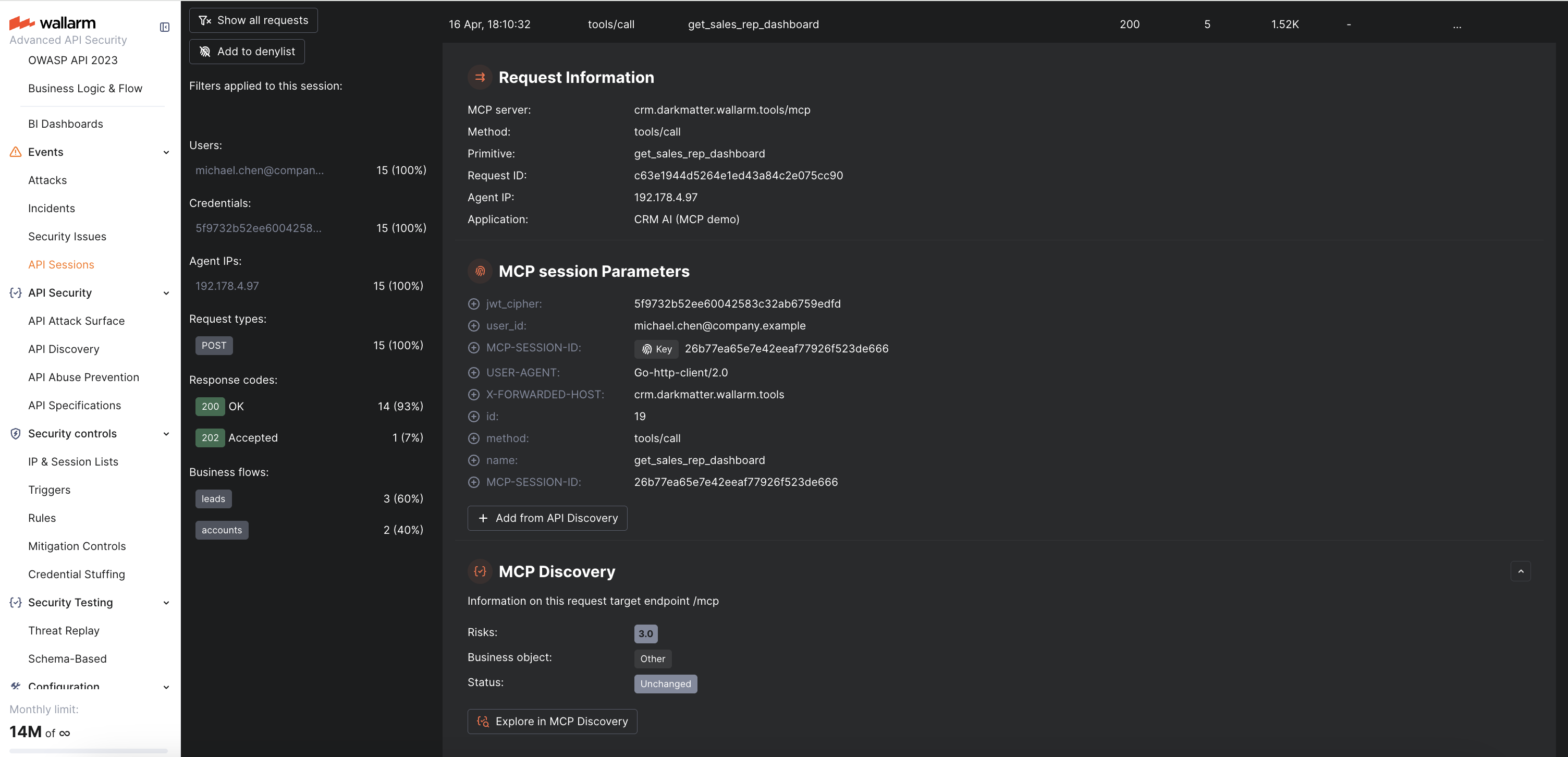
Viewing attacks in MCP Sessions
Attacks detected by MCP mitigation controls are displayed directly within the MCP session where they occurred. In the request details, you can see:
-
The attack type (ACL Violation, MCP Request Verification Failure, Invalid Tool Call)
-
A link to the mitigation control that triggered the detection
-
The full request content that caused the violation